100% offline · on-device AI

Your scans, named by what’s inside them

AI File Renamer reads every document and photo on your own machine — the text, the document type, the people, the dates — and proposes a file name you would actually have typed yourself. Nothing is uploaded. Nothing is renamed until you say so.

Version 1.2.0 · Windows 10 & 11, 64-bit · installs from the Microsoft Store, no administrator rights.
The Store listing is in preparation — this button goes live with it.

Rename — 3 proposals ready for review

  • SCAN_20230817_123912970.pdf is proposed to become Birth certificate - Jane Doe - 2023-08-17.pdf
  • Document_2025-02-25_103002.pdf is proposed to become Marriage certificate - John Smith - 2025-02-25.pdf
  • IMG_20230612_141045.jpg is proposed to become 2023-06-12 - Two people hiking on a mountain trail.jpg

Illustrative example with invented names. Proposals are editable, and nothing is written to disk until you press Apply.

The problem

A folder of Scan_0001.pdf is a folder you can’t search

What your scanner and phone produce

  • SCAN_20230817_123912970.pdf
  • Document_2025-02-25_103002.pdf
  • 2025-02-24_154842.pdf
  • IMG_20230612_141045.jpg
  • Receipt_2025-07-30_141045 (1).pdf

A timestamp tells you when you pressed the button — never which certificate, which contract, or whose passport. Finding one document means opening a dozen.

What the app proposes instead

AI File Renamer opens each file, extracts the text (OCR, or the PDF’s own text layer when it has one), works out what the document is, who it names and which date actually matters — the issue date, not the birth date or the expiry date.

The result is a name in the shape you would have written by hand — document type, person, place, date — plus searchable metadata written inside the file itself.

Features

Built for an archive of private documents

Passports, certificates, medical records and family photos are exactly the files you would never paste into a web service. So none of this needs one.

Fully offline, on-device AI

Recognition, classification and naming all run locally. Your files never leave the machine, and the app works with the network cable pulled out — the only traffic it ever makes is downloading the recognition models you choose to install.

OCR in 20+ languages

Latin, Cyrillic, Greek, Arabic, Devanagari, Chinese, Japanese, Korean, Thai, Tamil and Telugu recognition packs, installed one at a time from Settings. The script is detected automatically — adding a language is a download, never an app update.

Names from the content

Document type, person, place and date are read off the page and composed into a name. The same facts are embedded in the file — PDF Info/XMP, JPEG EXIF — so they survive copies, moves and cloud sync, and Windows Search can index them.

Review first, undo always

Every proposal is listed with its confidence before anything changes. Edit a name, untick a row, open the file. Applied batches are journaled, so a single Undo puts every file back the way it was.

Duplicate detection

Finds byte-identical copies and visually similar re-compressions across an entire tree — the (1), (2) sediment of years of syncing. Strictly a report: it groups them for you and never deletes anything.

Optional GPU acceleration

The optional local language-model tiers — which sharpen difficult names and describe photos — run about three times faster on a Vulkan-capable GPU, and fall back to the CPU automatically when there isn’t one.

How it works

Three steps, and none of them are irreversible

  1. Choose a folder

    Point the app at a folder. PDFs (including multi-page), JPEG, PNG and TIFF are analyzed; anything else is skipped and reported, never touched. Large archives process incrementally, so a second run only looks at what changed.

  2. Review the proposals

    Each file arrives with a proposed name, a scan-or-photo classification and a confidence score. Correct anything you disagree with, uncheck what you want left alone. Nothing has been written to disk yet.

  3. Apply — and undo any time

    Apply embeds the metadata and renames the accepted files through a journal. Change your mind and Undo restores the original names for the whole batch.

Privacy

Your documents never leave your computer

This is not a policy decision that could be reversed in an update — it is how the app is built. The recognition models run inside the application on your own hardware, and there is no server on the other end to send anything to.

Read the full privacy policy

  • No cloud processing. OCR, naming and photo description all run on your CPU or GPU, locally.
  • No account, no sign-in. Install it and use it. There is nothing to register and no licence server to phone.
  • No telemetry, no analytics. No usage statistics, no crash pings, no file names or contents sent anywhere.
  • One honest exception. Recognition models are downloaded when you click Download in the app. That is the app’s only network traffic, ever.

Screenshots

See it before you install it

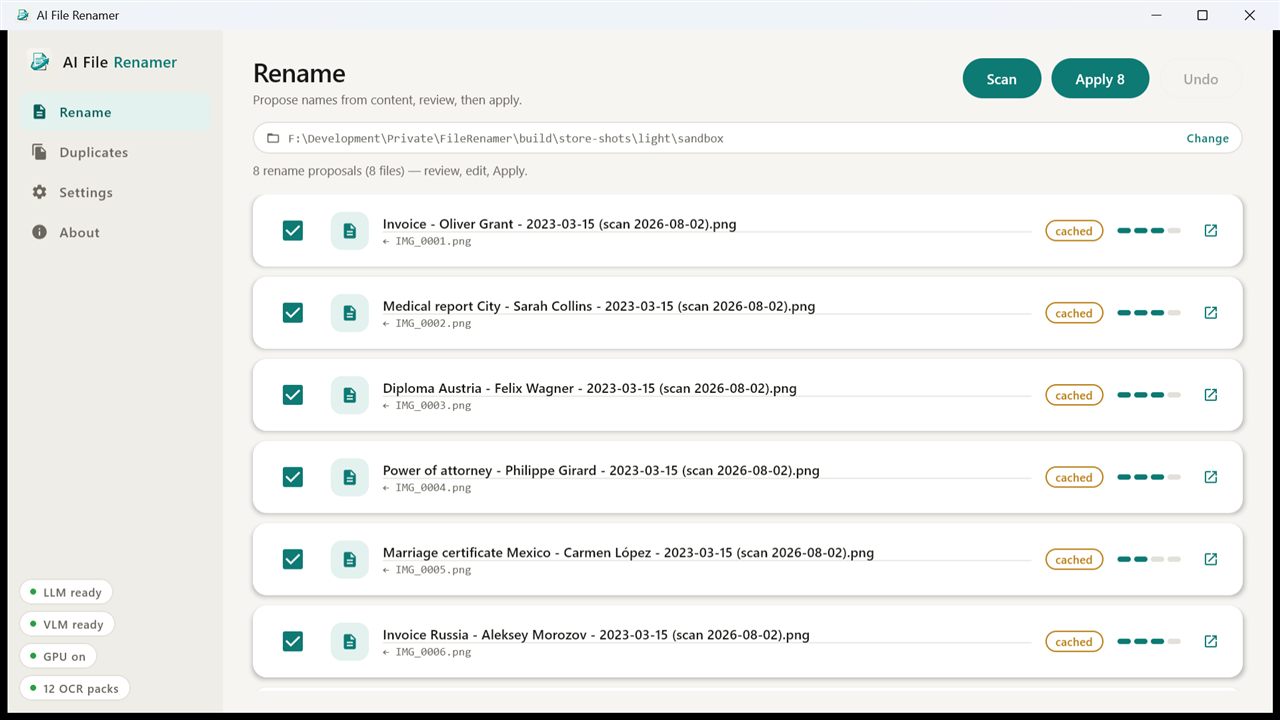
The Rename screen listing eight proposed file names, each showing the original camera-style name beneath it, with confidence meters and per-row checkboxes.
Every proposal is shown with the name it replaces. Nothing changes until you press Apply.
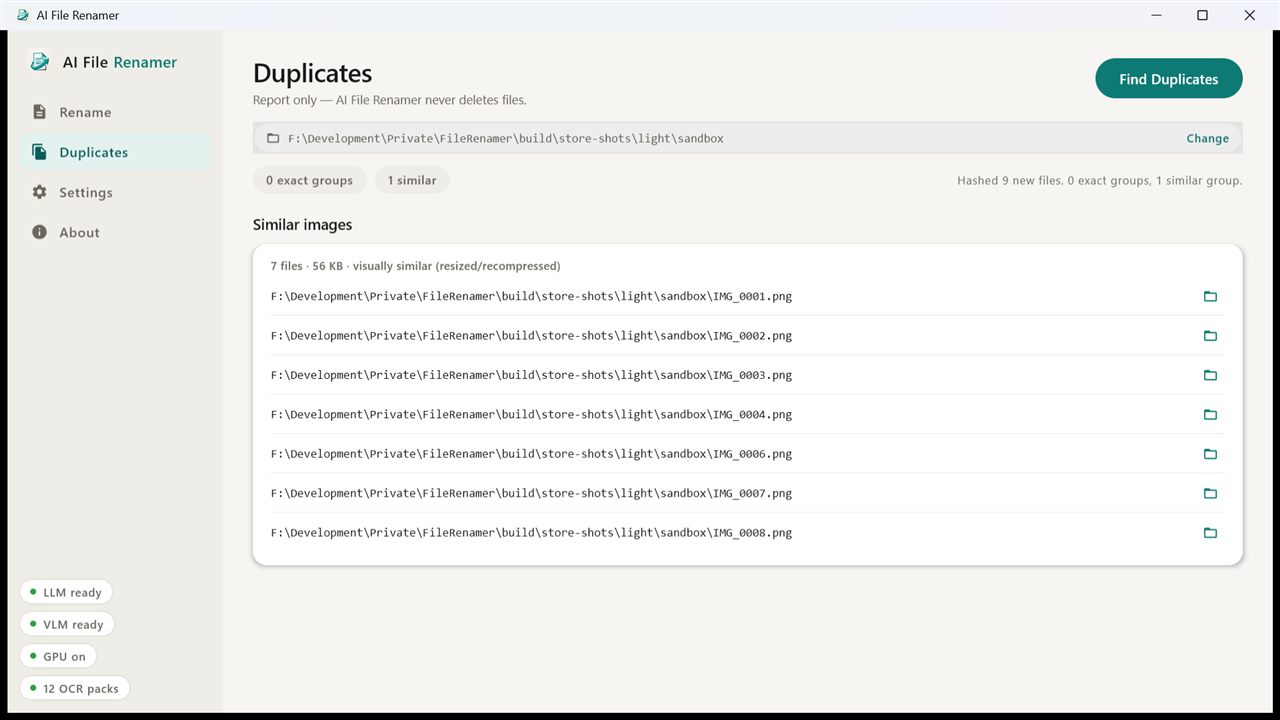
The Duplicates screen showing an exact-match group and a visually-similar group, each listing full file paths.
Duplicate detection is report-only — the app never deletes a file.
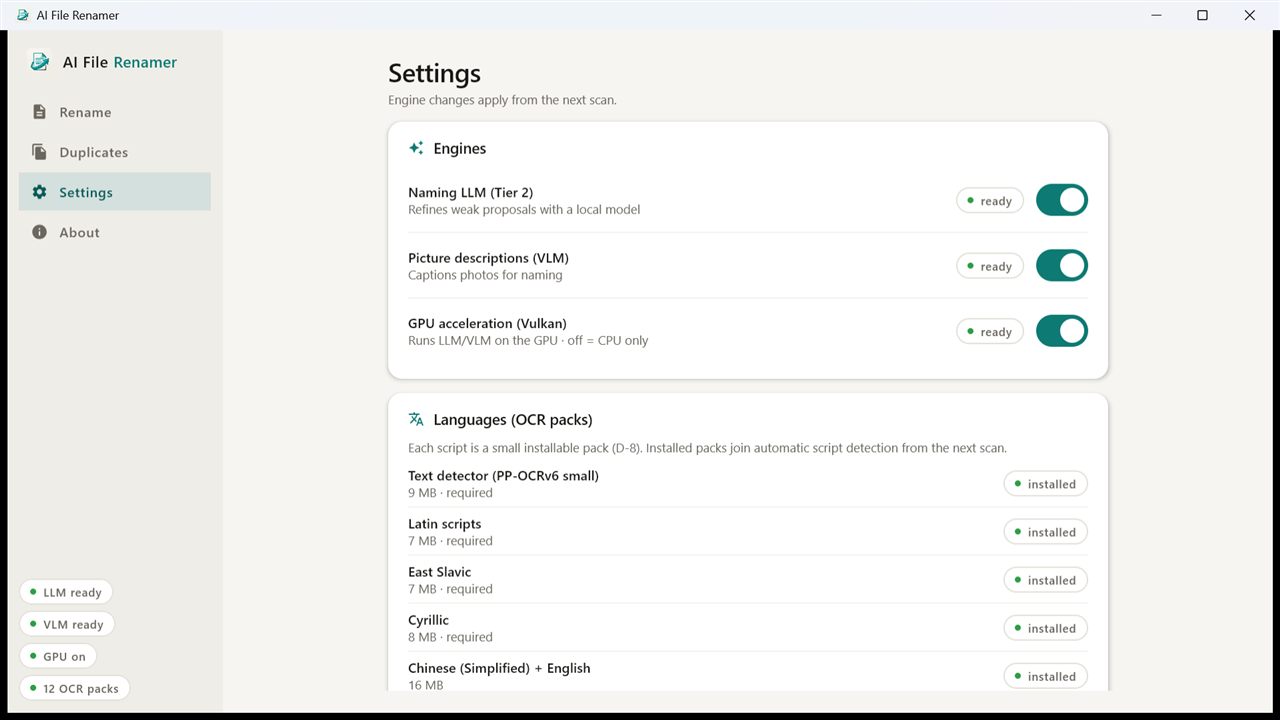
The Settings screen with cards for naming presets, language model packs, engines and GPU acceleration, and the index cache.
Language packs, naming order and the optional local AI tiers are all yours to switch off.

FAQ

Questions worth asking

Is it really offline?

Yes. All analysis runs on your machine. The one time the app uses the network is when you click Download to install recognition models (roughly 34 MB for the required set, more for optional languages and the local language models). After that you can disconnect entirely and everything still works.

Which languages does it read?

Recognition packs cover 20+ languages across Latin, Cyrillic, Greek, Arabic, Devanagari, Chinese, Japanese, Korean, Thai, Tamil and Telugu scripts; you install only the ones you scan. The script is detected automatically, and a page it cannot read is reported as unrecognized rather than named from garbage. Hebrew is not supported today — no suitable recognition model exists upstream.

Does it move, delete or re-encode my files?

No. Files are renamed in place, and metadata is written without re-compressing an image or re-rendering a PDF. Duplicate detection only produces a report — it never deletes. Undo restores the original names; the metadata it embedded is additive and stays, which is deliberate.

What does it cost?

It will be a paid app with a free trial, sold through the Microsoft Store. The trial and the purchase are handled entirely by Windows — there is no licence key to enter, no account to create, and the app itself never contacts us.

What do I need to run it?

Windows 10 or 11, 64-bit. The installer is per-user, so no administrator rights are required. Budget about 250 MB for the app plus the models you install. The OCR engine needs the Microsoft Visual C++ x64 redistributable, which is already present on most systems.

What about macOS, Linux and mobile?

The engine is cross-platform by design and the shared core is built to be reusable on Android and iOS later, but Windows is the only packaged, tested build today. There is no release date for the others.